Good news first: there’s a new studio. Studio 6 is live, and it’s called Color Lab.
Color Lab has been floating around on my roadmap for ages. I’d even built an early version at some point, poked at it for a while, and then left it alone because I had no idea where I wanted to take it. Then earlier this week I was researching some things for the site, stumbled onto a few ideas, and something clicked. Oh. That’s the one.
So I built it.
And it turned out better than I’d hoped. I keep being surprised by what a browser can do these days, which is a bit silly considering I’ve been building Lumen Tool inside one this whole time. Apparently part of my brain still thinks browsers are for reading email and losing tabs.
What Color Lab does
Color Lab is a playground for color and light on a full 3D model. You get several colored lights and you can control each one on its own. You can move them anywhere around the model. You can change the light on the background too.
Put teal on one side and hot pink on the other and see what happens. Build a moody night scene, then throw it away and go for something loud. Honestly, it’s a lot of fun just to play with. But it’s also genuinely useful. You can see how colored lights overlap and mix on skin and clothing, and you can use it to prepare a real studio setup before you start dragging stands around.
It’s called Color Lab, but I’m not going to claim it’s lab-accurate. What it does show you, pretty convincingly, is what’s going to happen before you ever switch a light on.
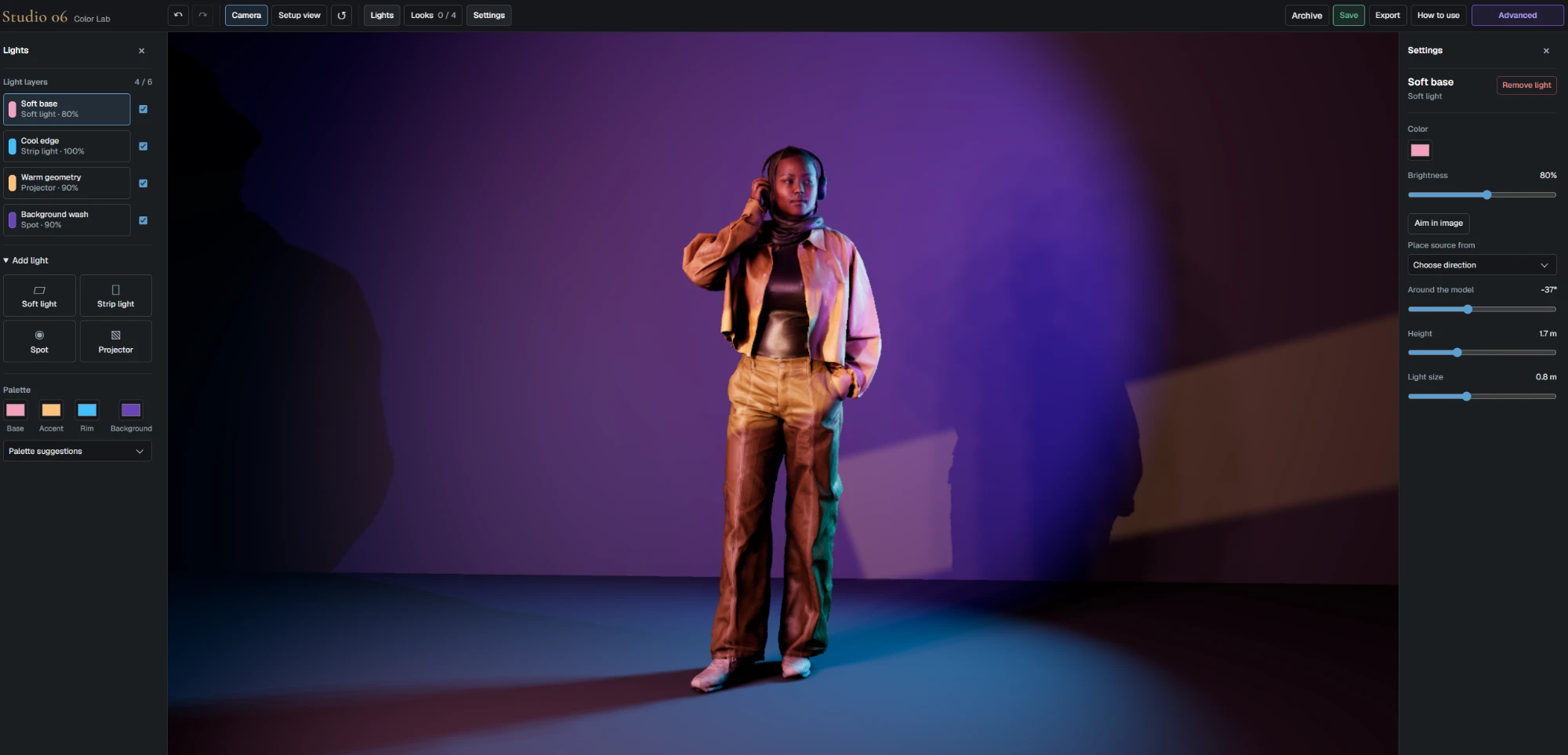
Color Lab is live now for everyone with a paid membership.
A quick word about performance
One thing I’ll keep bringing up as Lumen Tool grows is performance, so bear with me.
I optimize wherever I can, and I’ll keep doing that. But realistically, Lumen Tool is happiest on a desktop or a decent laptop. A recent iPad does fine too. For the heavier 3D studios a reasonably powerful machine helps a lot, and a proper graphics card helps even more.
That also means some studios will run better on lighter devices than others. The original Lumen Tool Lighting Simulator runs happily on a tablet or a modest laptop. The newer stuff is a different animal, especially the 3D Set Builder that’s on its way.
I could strip everything down until it runs smoothly on a toaster. But then I’d have built a toaster-grade tool, and that kind of defeats the point of making something visual and ambitious in the first place. So I keep hunting for the middle ground, where as many people as possible can use it and the fun stuff stays in.
Who Color Lab is for
As usual, I had no idea beforehand who would end up using it most. My guess is that Color Lab will click more with photographers and videographers, and anyone who spends their days in a photo or video studio, than with illustrators and artists.
And that’s going to keep happening. Sometimes I’ll build something photographers love, and the next thing will be much more for the artists. I’m not planning to split Lumen Tool into two websites with two subscriptions. The plan is simply to keep adding studios until everyone has a few they genuinely can’t do without.
Meanwhile, in Studio 5
I’m still working on Studio 5. That’s the one I mentioned in my previous post. The idea for it came while I was writing my comparison of set.a.light 3D and Lumen Tool.
Somewhere halfway through that comparison I had a “genius” idea 😉 What if I built a tiny version of set.a.light 3D. In a browser.
What could possibly go wrong?
Well. To my enormous surprise, it’s slightly more complicated than I imagined.
I knew it would be hard, obviously. The real headache is that I want it to run in the browser and stay simple at the same time. And when the thing you’re building is basically made of controls and options, “simple” turns into a pretty interesting puzzle. I honestly still don’t know how simple I can get it.
That said, I’m really happy with where it’s at. The basics work. There are 3D rooms, there are 3D models, and there’s actual light. You can put a model in a space, place your lights and start building a setup. That’s the point where I stopped wondering and started knowing I can get this ready for release.
The optimizing is going to take a lot longer.
A beta, and a proper one
Studio 5 will keep changing over the coming months. When it goes live for members it’ll be a beta, and a proper one. Expect bugs, and bits that run slower than they should. And expect me to rip out a few things and rebuild them from scratch along the way.
But I don’t want to keep it hidden from members until every last detail is perfect either. So the plan is still to open it up fairly soon and keep building from there. I actually like that: growing this one slowly, out in the open.
And like I said last time, I’m obviously never going to replace set.a.light 3D. Rebuilding a full desktop application inside a browser tab would be completely unrealistic, and I’m only mildly delusional. What I do think is possible is the heart of it: a model in a 3D space, some lights, and a setup that looks really good.
Hopefully you’ll get to play with it very soon.