The third Lumen Tool Studio module is now live, and this one is called the Archive.
I want to keep building Lumen Tool into something bigger than a single lighting tool. After launching Reference Lab, the next logical step was to create a proper place for the setups and reference work you make inside Lumen Tool.
Saving already existed, but it meant downloading a JSON file to your computer. It worked, and that option still has its uses, but it is not the easiest way to use software. You have to remember where the file went, keep your own folders organised and move everything manually if you want to continue on another computer.
The Archive is designed to make that part much simpler.
Your lighting setup library inside Lumen Tool
The Archive is your own library inside Lumen Tool Studio. Work saved from the Lighting Simulator or Reference Lab can be stored with your account, organised and opened again later.
Every saved item has a visual preview, so you can see what you are looking for instead of digging through filenames. You can keep related setups together, add notes and useful information, and return to an idea when you are ready to continue working on it.
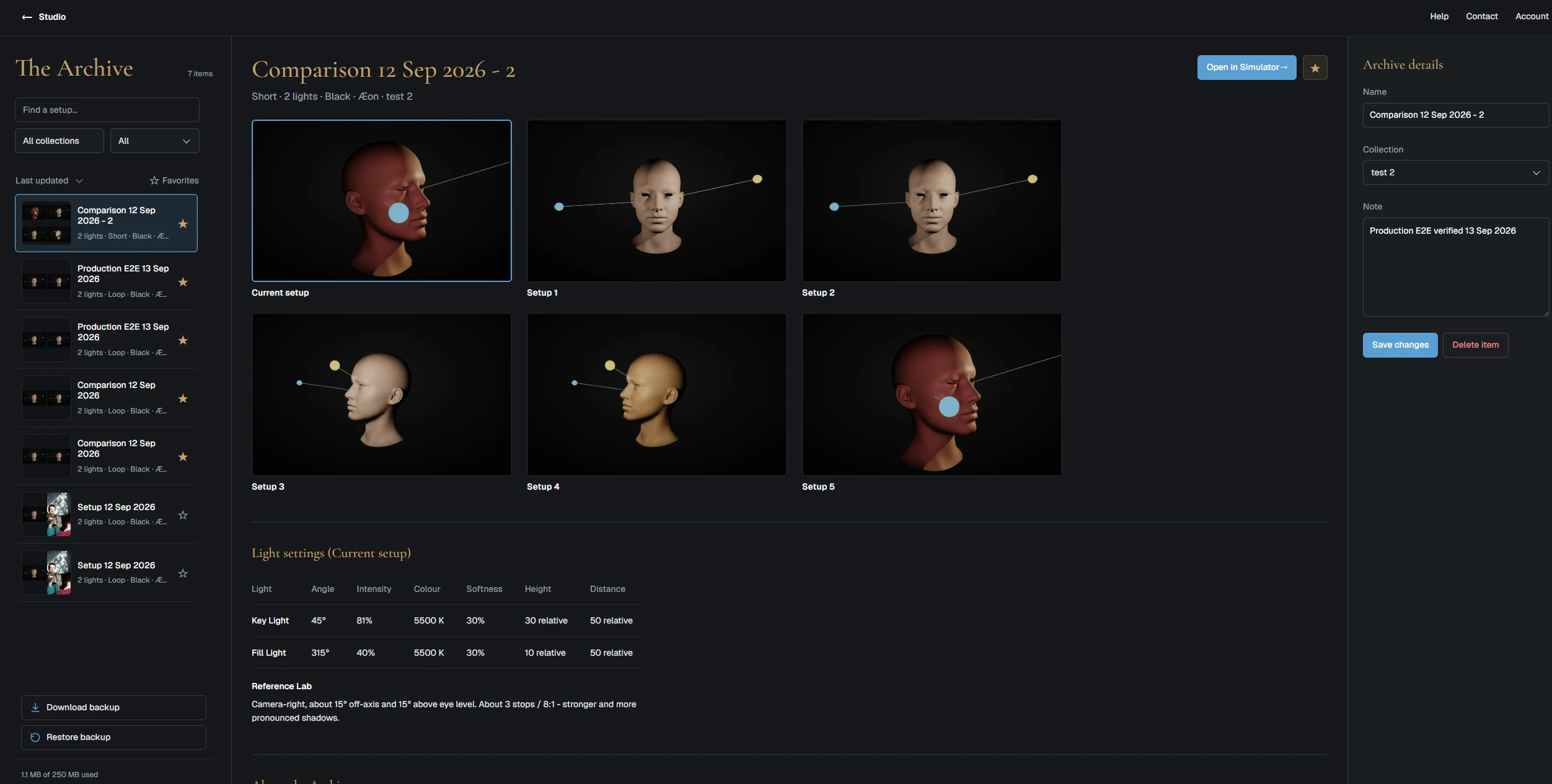
The main idea is simple: your work stays connected to your Lumen Tool account instead of being tied to one computer.
That matters when you work in more than one place. You might build a portrait lighting setup at home, refine it later in the studio and want to open it again on a different computer without moving files around first. With the Archive, the setup is already there when you sign in.
Save work from the Lighting Simulator and Reference Lab
The Archive is not just a folder for isolated lighting diagrams. It is built around the way the Lumen Tool modules work together.
You can save lighting setups from the Simulator, including the settings that shaped the result. Work that started in Reference Lab can retain the portrait and lighting analysis that helped you build it. Saved comparisons can keep multiple setups together, which makes it easier to revisit different versions of the same idea.
That gives you more than a screenshot. You keep the setup itself, so you can open it again in the Lighting Simulator and continue adjusting the lights.
Download your complete Archive as a ZIP backup
There is one part of the Archive that I especially wanted to include: a complete downloadable backup.
You can download your Archive to your own computer as a ZIP file. Your work is not locked inside Lumen Tool, and you do not have to keep paying just to preserve access to the setups you created.
If you decide to pause your Lumen Tool Studio subscription, you can download everything first. If you return later, you can import the original ZIP and continue where you left off. You can also keep the ZIP as your own backup and unpack it whenever you want.
The backup is deliberately made to be useful outside the application too. It contains a browsable copy of your Archive, along with the original data needed to restore it properly in Lumen Tool.
Built for planning now, with production use next
The foundation of the Archive is live and working, but I have more ideas for it.
One area I especially want to expand is how saved setups can be used during an actual production. Lumen Tool itself is not designed as a phone-first application, but saved setups should be easy to view on a phone when you are in a studio or on location.
If you are a photographer, filmmaker, illustrator or part of a crew, you should be able to open a saved setup quickly and see the important information: where the lights were positioned, how the shadows should fall, which colours or filters were used and any notes you added while planning.
You might research and build a lighting setup at home, but the moment you really need that information is often later, beside the camera and lights. I want to make that handover from planning to production much easier.
Whether that becomes an extension of the Archive or eventually a separate Lumen Tool module, I do not know yet. I want to think properly about what would be useful instead of building something only for the sake of adding another feature.
Archive storage for paid Studio accounts
The Archive is available to Lumen Tool Studio members. Every paid account currently includes 250 MB of online storage.
Online storage has a real ongoing cost, so it is not something I can offer to every free user. I hope to raise the limit later, perhaps to 500 MB or 1 GB, once I have a better picture of how people actually use the Archive.
For now, 250 MB should be enough for most people to build a useful library of lighting setups, previews, comparisons, notes and selected reference images.
Lumen Tool is becoming a complete software package
The Archive is an important addition because it changes how the rest of Lumen Tool fits together.
The Lighting Simulator is where you build and test a setup. Reference Lab helps you study the lighting in a portrait and turn it into a practical starting point. The Archive gives that work a permanent home where you can organise it, reopen it and keep your own backup.
Together, those modules make Lumen Tool feel less like one isolated tool and more like a connected software package for planning, studying and saving lighting ideas.
I am really happy with how the Archive turned out, both in how it works and how it looks. I hope the people using it will feel the same.
And now, on to the next module. I already have a few ideas, but nothing concrete yet. Whatever it becomes, I want it to be something Lumen Tool users will genuinely be happy to have.